Track and Categorize Property Expenses
Uitgaven is where you track and categorize what each property costs.
Keeping this area up to date makes your operating-cost statements and tax reports much easier later.
Add and categorize
Use the expenses list to record and organize every cost related to your properties:
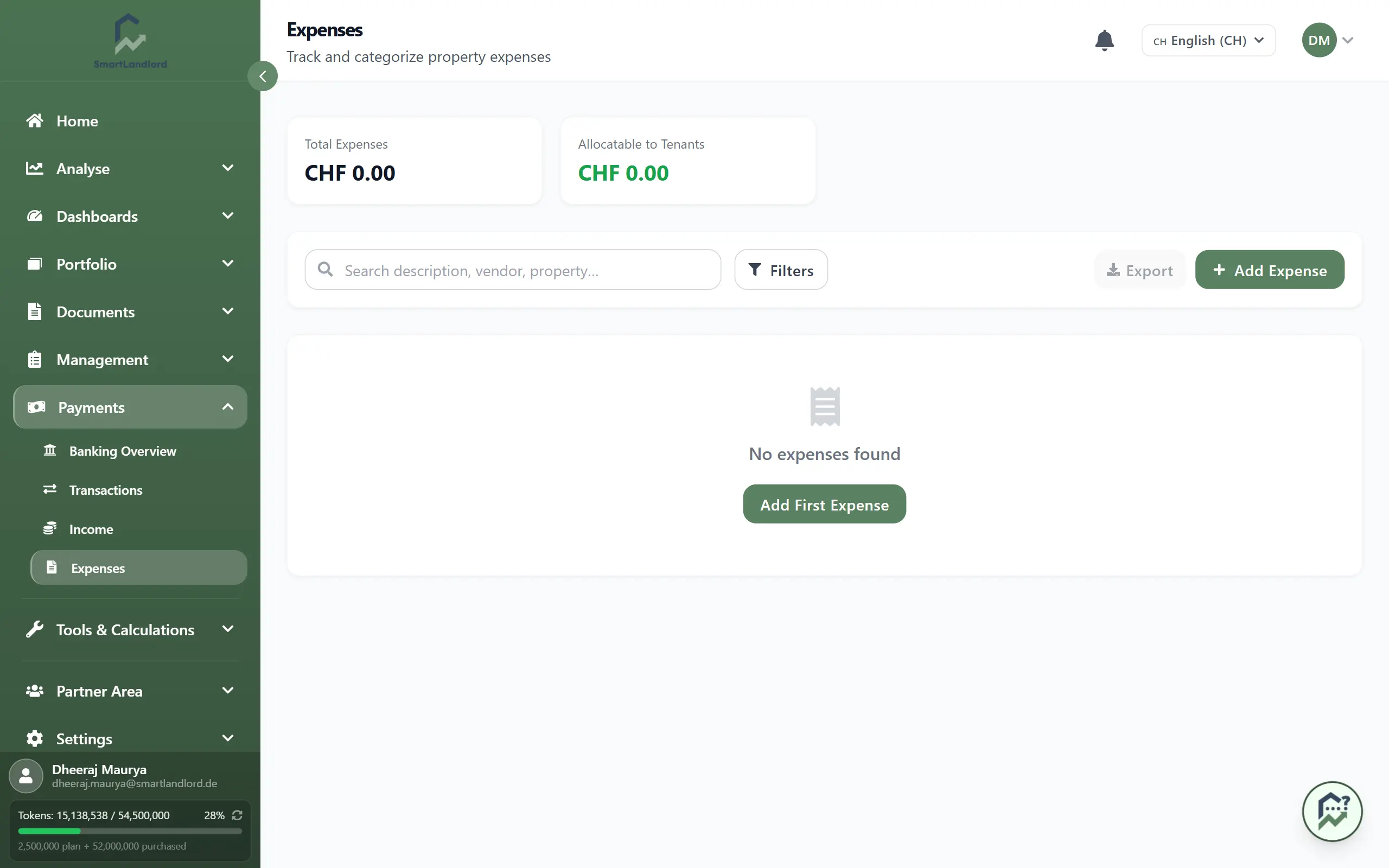
- Click Kosten toevoegen to record an expense with its category, property, and amount. Add a clear description and vendor so you can recognize it later.
- Mark whether the expense is Toe te wijzen aan huurders, so it can flow into your operating-cost statements where applicable.
- Use filters to narrow down the list by category, allocatable status, or property, and search by description, vendor, or property name when you are looking for specific entries.
Make sure each expense is linked to the correct property and category so downstream calculations and reports stay accurate.
What you see
The expenses overview gives you a centralized view of all recorded expenses across your properties.
From this screen you can:
- Review expenses for one or multiple properties.
- Search for expenses by description, vendor, or property name.
- Filter expenses by category.
- Filter expenses by allocatable and non-allocatable status.
- Review expense amounts and dates.
- Quickly identify missing or incorrectly categorized entries.
Using filters regularly helps you locate information faster, especially when managing multiple properties.
Expense categories
Choosing the correct category for each expense helps keep your records organized and makes reporting easier later.
Common categories may include:
- Maintenance and repairs
- Utilities
- Insurance
- Property management fees
- Cleaning services
- Landscaping and outdoor maintenance
- Administrative costs
- Professional services
Use categories consistently across all properties whenever possible. Consistent categorization makes it easier to compare costs between properties and identify spending patterns over time.
If you are unsure which category to choose, select the category that best reflects the primary purpose of the expense.
Allocatable and non-allocatable expenses
Some expenses can be passed on to tenants through operating-cost statements, while others remain the responsibility of the property owner.
When recording an expense, carefully review whether it should be marked as allocatable. Correct classification helps ensure that future operating-cost calculations and reports remain accurate.
For expenses that benefit multiple units or tenants, make sure the expense is assigned correctly so that later calculations can use the appropriate information.
Review allocatable expenses periodically to ensure that records remain consistent throughout the year.
Reviewing expense records
Regular reviews help keep your expense data accurate.
When reviewing expenses, consider:
- Whether each expense has been assigned to the correct property.
- Whether categories have been applied consistently.
- Whether descriptions clearly explain the purpose of the expense.
- Whether vendor information has been entered correctly.
- Whether allocatable expenses have been marked appropriately.
Accurate records improve reporting and make future analysis easier.
Export
Use Exporteer to download your filtered expenses. The export respects the filters and search you have applied, so you can:
- Share a subset of expenses with your tax advisor or bookkeeper.
- Analyze costs by category or property in your own spreadsheet tools.
This is especially useful at year end or when preparing operating-cost statements for your tenants.
Working with exported data
Exported expense data can help you review property performance in more detail.
For example, you may want to:
- Compare maintenance costs across properties.
- Review annual operating expenses.
- Identify recurring vendor costs.
- Analyze spending trends over time.
- Prepare supporting documentation for accounting purposes.
Because exports respect the filters you have applied, you can create focused reports for a specific property, category, or period without manually removing unrelated entries.
Best practices
The following practices help keep your expense records accurate and useful:
1. Record expenses as soon as they occur.
2. Use clear and consistent descriptions.
3. Assign each expense to the correct property.
4. Review categories regularly.
5. Verify allocatable status before saving.
6. Periodically review older records for accuracy.
Maintaining accurate expense records throughout the year reduces administrative work later and improves the quality of reports generated from your portfolio data.
Related areas
Expense data contributes to several other areas within SmartLandlord.
Keeping expenses current helps support:
- Operating-cost statements.
- Property performance analysis.
- Cashflow reporting.
- Portfolio reporting.
- Year-end financial reviews.
Accurate expense information provides a stronger foundation for understanding property performance and maintaining reliable portfolio records.