My Inventory — Manage Your Property Portfolio
Use Mijn inventaris to manage, search, and review all properties in your portfolio.
Open it under Portfolio → Mijn inventaris.
From here, you can:
- View all properties in your inventory.
- Add new properties.
- Search and filter existing properties.
- Open property profiles and analyses.
- Access payments, units, and other property-related actions.
The inventory serves as the central overview of your properties and provides access to many property-related functions throughout SmartLandlord.
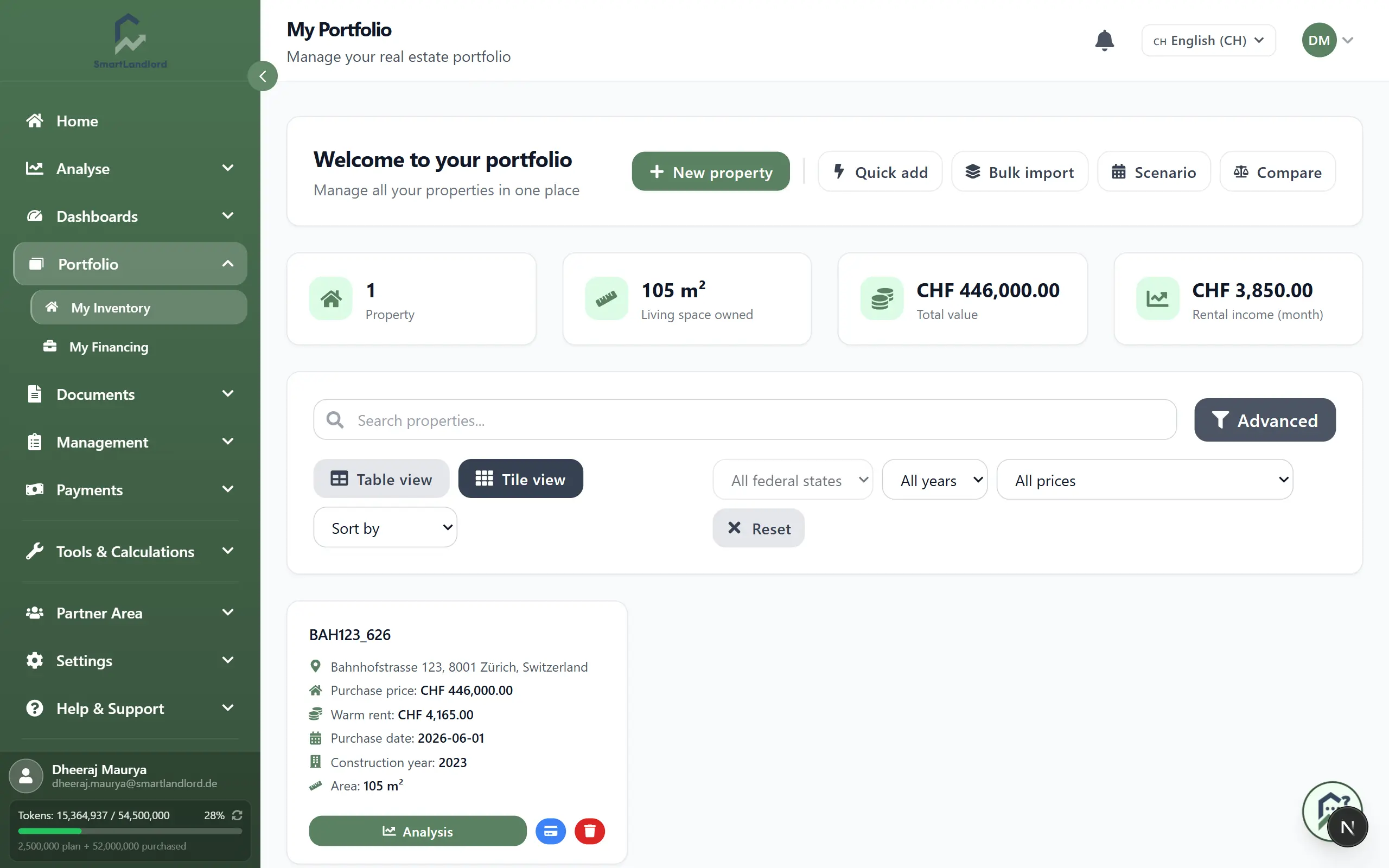
What you see
At the top of the page, you will find summary cards with key portfolio figures:
- Number of properties – Total count of properties in your inventory.
- Woonruimte in eigendom – Total living space across all properties.
- Totale waarde – Combined market or purchase value of all properties.
- Rental income/month – Total monthly rent you expect or collect.
These summary figures provide a quick overview of your portfolio and update as property information changes.
Below the summary cards is the main inventory area:
- A search box and filters to narrow down the list.
- Properties displayed as tiles by default.
- An option to switch to Tabelweergave and sort by name, price, purchase date, or area.
- A badge Onvolledig on properties missing essential information such as address, purchase price, living area, or cold rent.
Properties marked with Onvolledig are missing essential information. Complete these records to ensure analyses, dashboards, reports, and portfolio calculations remain accurate.
Add a property
You can add properties in different ways depending on your workflow and the amount of information available.
Nieuw eigendom
Starts the guided property analysis process. This option walks you through the required information step by step and creates a complete property profile once the analysis is finished.
Snel toevoegen
Creates a property using only the most important details such as address, purchase price, area, and rent. Additional information can be added later from the property profile.
Bulkimport
Imports multiple properties at once from structured data, making it easier to set up an existing portfolio.
Vergelijken
Displays selected properties side by side so you can compare key metrics such as value, rental income, and yield.
Adding a property uses one of the property slots included in your subscription. If no slots remain, SmartLandlord will prompt you to upgrade before continuing.
Search and filter properties
As your portfolio grows, search and filters help you locate properties more quickly.
You can use the available tools to:
- Find a property by name.
- Narrow the list using available filters.
- Review only incomplete properties.
- Switch between different display modes.
Using search and filters regularly can make it easier to manage larger portfolios.
Work with a property
Each property tile or table row includes quick actions that provide direct access to common tasks:
- Profiel bekijken – Open the complete property profile.
- Analyse – Open the property's ImmoCheck analysis results.
- Betalingen – View banking transactions and payment history related to the property.
- Eenheden – Manage units within multi-family properties.
- Verwijderen – Remove the property from your inventory after confirmation.
You can also click directly on a property tile or table row to open its profile and continue managing property details, analyses, tenants, leases, and related information.
> Tip: Use search and filters to quickly find a specific property before opening its profile or using one of the available actions.
Keeping property information current
Properties marked with Onvolledig are missing important information.
Reviewing and completing property information helps ensure that related analyses, dashboards, and reports use the most complete data available.
Keeping property information current helps ensure that related analyses, dashboards, financing calculations, reports, and portfolio metrics use the most accurate data available.
Keeping property records current also makes it easier to manage the portfolio as it grows.
The inventory area provides the foundation for many other SmartLandlord features and serves as the primary place for managing property information.