Track Property Financing and Loans
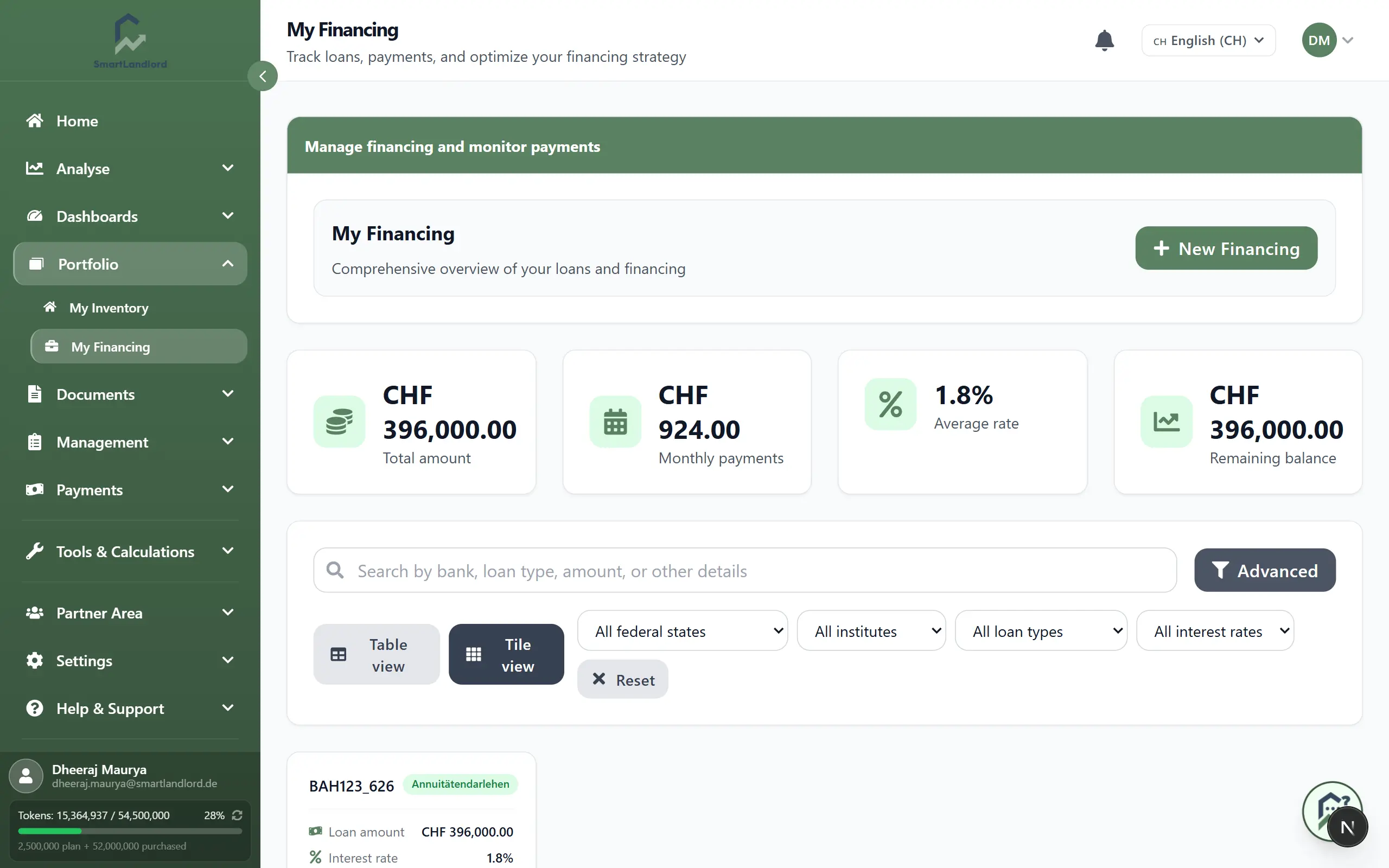
The Mijn financiering page lets you track all your loans and mortgages in one place at portfolio level. Open it under Portfolio → Mijn financiering.
Use this page to see your total financing, monthly payments, average interest rate, and remaining balances, and to manage each individual loan including its amortization schedule.
Financing information affects portfolio calculations, cashflow analysis, amortization schedules, dashboards, and financial reports. Always keep loan data accurate and up to date.
1. What you see
At the top you see summary cards that give you a quick portfolio overview:
- Totaal bedrag – Sum of all original loan amounts you have entered.
- Maandelijkse betalingen – Total of all current monthly instalments across your loans.
- Gemiddelde koers – Weighted average interest rate across all loans.
- Overblijvend saldo – Total outstanding balance you still have to repay.
Below the cards you see a list of all loans, either as a table or as tiles, with key information such as lender, loan type, rate, and remaining balance.
2. Nieuwe financiering
Use Nieuwe financiering to add a loan or mortgage so it is included in your totals and schedules.
You typically enter:
- Leningbedrag – Total amount you borrowed (original principal).
- Kredietinstelling – Bank or lender providing the loan.
- Rentevoet – Annual interest rate (for example, 8.5).
- Aflossingspercentage – Regular repayment rate or percentage, depending on your product.
- Start date – Date when the loan started or the first instalment is due.
- Type lening – Type of financing, such as mortgage, personal loan, overdraft, or other.
Steps:
1. Click Nieuwe financiering.
2. Fill in the loan details from your contract.
3. Check that amount, rate, and dates are correct.
4. Click Opslaan.
Verify the loan amount, interest rate, repayment rate, and dates before saving. Incorrect values will affect repayment schedules, cashflow calculations, and portfolio reports.
After saving, the loan appears in the list and the summary cards update automatically.
3. View, search, and filter loans
All loans you add are listed on the My financing page.
You can:
- Search to find a loan by name, credit institution, or other text.
- Filter by attributes (for example, loan type) to focus on certain loans.
- Switch views between:
- Tabelweergave for a compact, sortable overview.
- Tegelweergave for a more visual, card-based layout.
Use this to quickly locate specific loans when you have many entries and to review them in the format you prefer.
4. Open a loan and see details
Click a loan (row or tile) to open its detail view.
You will see:
- Key loan data such as lender, loan amount, interest rate, repayment rate, start date, and remaining balance.
- An amortization schedule showing each instalment with interest, principal, and remaining balance over time.
- Information about upcoming payments.
Use this to understand how the loan develops over time, how much of each payment goes to interest vs. principal, and what you will still owe at specific dates.
> One screenshot of a loan detail view with the amortization schedule visible.
5. Edit or delete a loan
Use edit when conditions change or data needs correcting, and delete only for entries that should not exist.
Edit a loan
- Open the loan from the list.
- Click Bewerken.
- Update fields such as interest rate, repayment rate, or dates.
- Click Opslaan.
Any changes to financing details automatically affect amortization schedules, financing metrics, dashboards, and portfolio-level calculations.
The amortization schedule and summary cards are recalculated based on the updated data.
Delete a loan
- Open the loan from the list.
- Click Verwijderen.
- Confirm the deletion.
The loan is removed from the list and is no longer included in totals.
Deleting a loan permanently removes it from portfolio calculations and historical totals. Delete only if the entry was created by mistake.
> Tip: If a real loan is fully paid off, keep it for history (or mark it as completed if available) instead of deleting it, so reports remain accurate.