Manage and Organize Your Property Documents
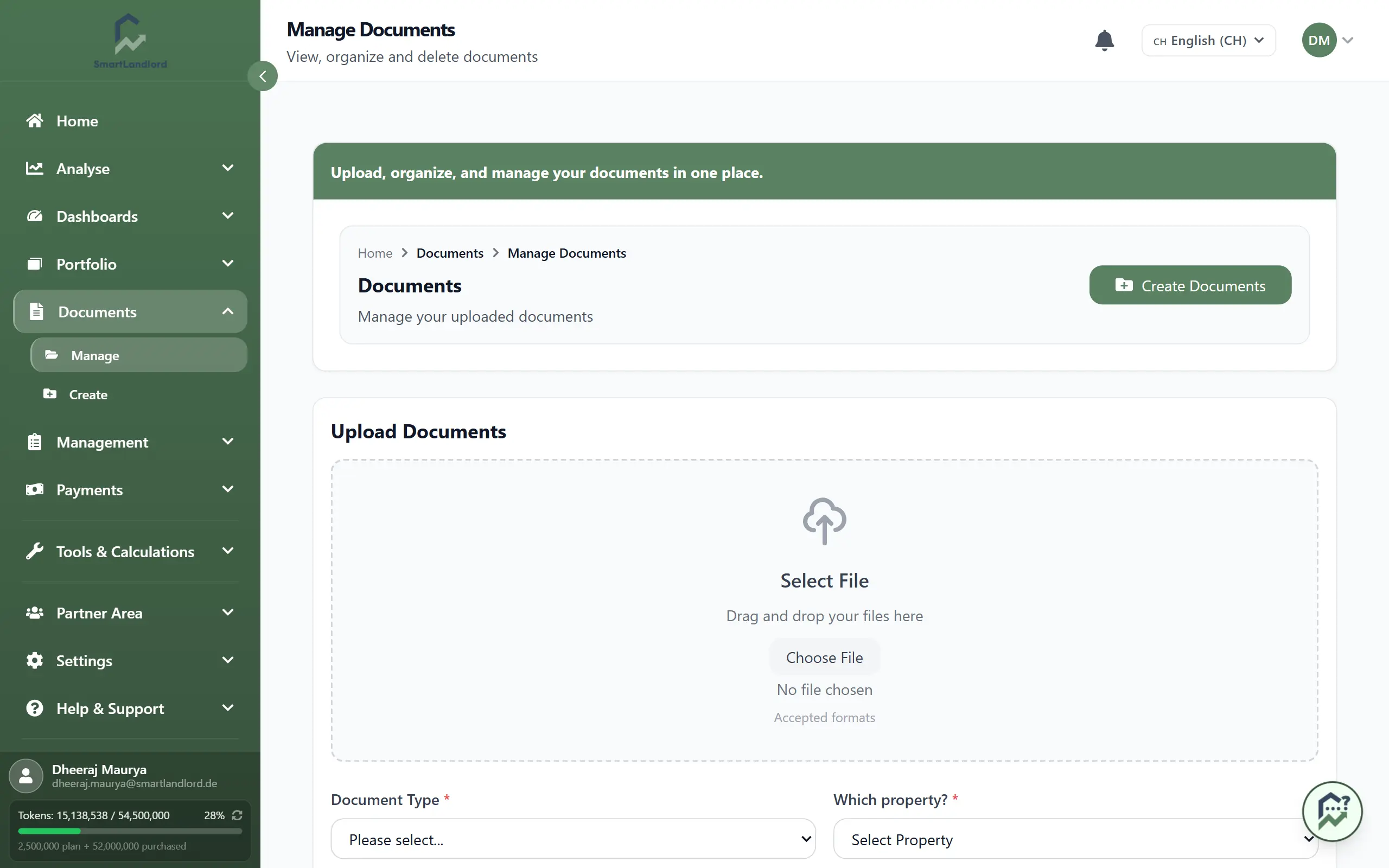
Store all your property paperwork in one place. Open Documenten → Documenten beheren to upload, find, and manage documents such as leases, contracts, certificates, and inspection reports.
Keeping documents organized in a central location makes it easier to find important records when they are needed and helps keep property information together.
1. Upload a document
To add a new file:
1. Go to Documenten → Documenten beheren.
2. Click Document uploaden.
3. Choose the file from your computer.
4. Pick the document type (for example, lease, maintenance, certificate).
5. Select the property the document belongs to.
6. Confirm to upload.
Supported files include PDF, Word, and images.
Before uploading, verify that the selected document type and property are correct. Incorrect assignments can make documents difficult to find later.
2. Find and download documents
All your files appear under Opgeslagen documenten.
To find a document:
- Use Documenten zoeken... to search by name or text.
- Use the type filter to show only a specific document type.
- Use the property filter to show only documents for one property.
When you find the document you need:
- Click to download it.
- Or click delete to remove it from the system.
Searching and filtering can help you locate documents more quickly, especially when managing multiple properties and larger document libraries.
3. Organizing documents
Assigning the correct document type and property during upload helps keep records organized.
When documents are categorized consistently, it becomes easier to:
- Locate important records.
- Review property-related documentation.
- Find documents associated with a specific property.
- Manage larger collections of files.
Always link documents to the correct property and document type to maintain a well-organized document library.
Maintaining a consistent approach to document organization can save time later when searching for information.
4. Managing your document library
Review your stored documents periodically to ensure that information remains organized.
Consider checking for:
- Duplicate files.
- Incorrect document types.
- Documents linked to the wrong property.
- Outdated files that are no longer needed.
Regular reviews help keep the document library accurate, reliable, and easy to use.
5. Working with downloaded files
Downloaded documents can be viewed, shared, or stored outside SmartLandlord when needed.
If a document is updated, upload the latest version and review the stored records to ensure that the correct file remains available in the system.
Keeping document records current helps reduce confusion and ensures users can access the correct version when needed.
Keeping document records current helps reduce confusion and makes it easier to locate the correct version of a file.
Tips
- Use clear, consistent file names so you can find documents quickly.
- Always link documents to the correct property and type.
- Delete outdated or duplicate files to keep your library clean.
- Review stored documents periodically to keep records organized.
- Confirm document details before uploading new files.
The document management area serves as the central source for important property-related records throughout SmartLandlord.
The document management area provides a central place for storing and accessing important property-related records throughout SmartLandlord.