Flyer Generator — Create Property Marketing Materials
The Flyer Generator allows you to create branded marketing flyers that include your personal referral code and QR code.
Open it under Partnergebied.
Anyone who signs up using your referral code or QR code can be tracked through your partner account. Always verify that the correct referral information appears on the flyer before sharing it.
Use these flyers when promoting SmartLandlord to potential clients, partners, or contacts.
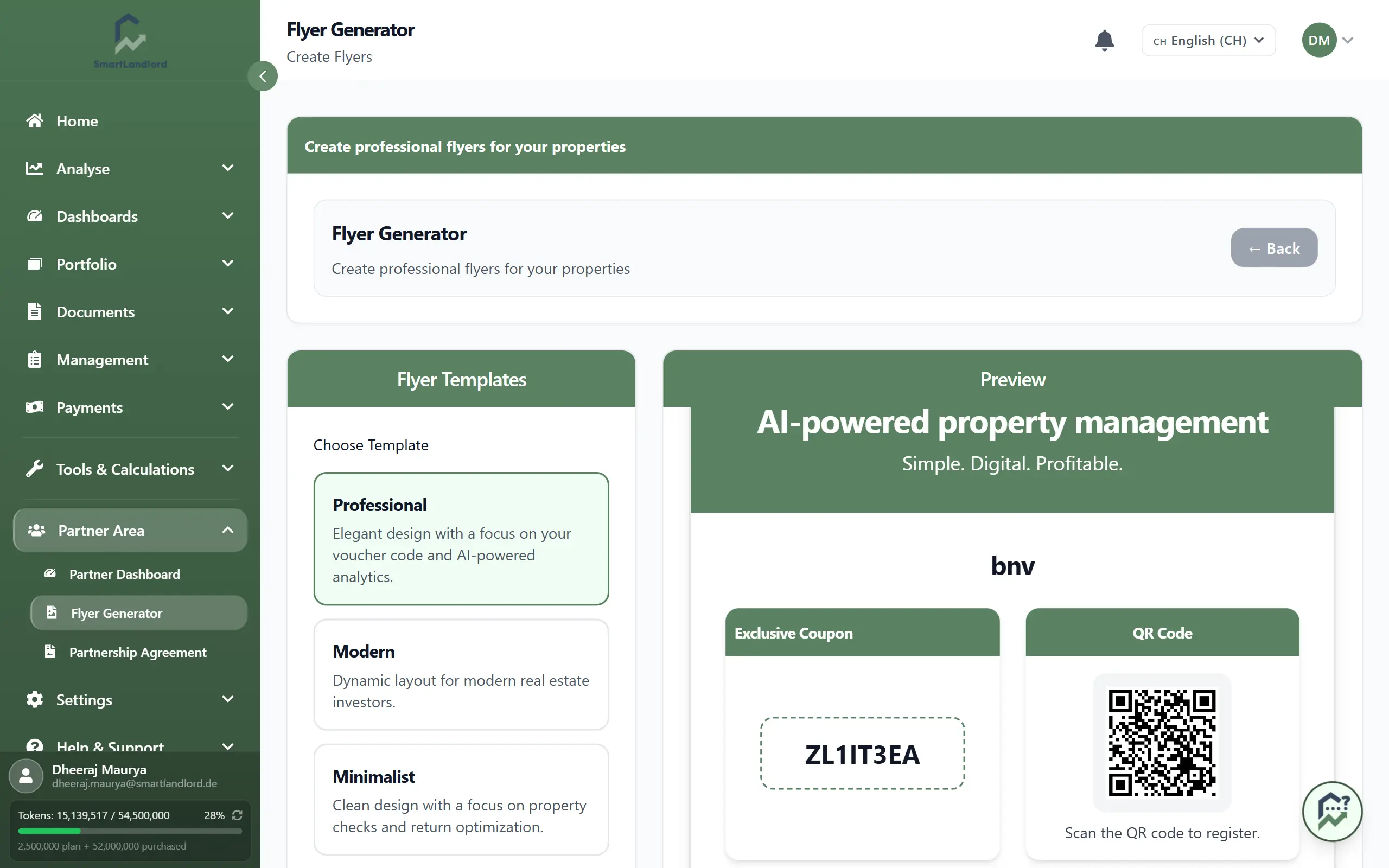
Create a flyer
The flyer generator provides several ready-to-use design templates.
Available templates include:
- Flyersjablonen such as Professional, Modern, Minimalist, Business, Creative, and Classic.
Select a template to see an instant preview of your flyer.
The preview automatically includes:
- Your referral or coupon code.
- Your QR code.
- The selected flyer design.
- Branding elements included in the template.
Review the preview carefully to ensure your referral code and QR code are displayed correctly before downloading.
This allows you to review the final appearance before downloading the flyer.
Customize your design
You can switch between available templates to find the style that best matches your audience.
As you change templates, the preview updates automatically so you can compare different layouts and designs.
Before downloading, verify that:
- Your referral code is visible.
- The QR code is clearly displayed.
- The overall design matches your intended use.
Download your flyer
Once you are satisfied with the design, download the flyer using:
- Downloaden PDF
- Afbeelding downloaden
Choose the format that best fits your needs.
PDF format
Use the PDF version when:
- Printing flyers professionally.
- Sharing flyers with print providers.
- Creating physical marketing materials.
Image format
Use the image version when:
- Sending flyers by email.
- Sharing in messaging apps.
- Posting on social media.
- Adding flyers to digital marketing materials.
Use PDF files for professional printing and image files for digital distribution to ensure the best presentation quality.
Reviewing your flyer
Before downloading a flyer, review the preview carefully.
Check that:
- The correct template is selected.
- Your referral code is displayed correctly.
- The QR code is visible and readable.
- The flyer layout appears as expected.
Review the flyer before downloading to avoid distributing materials with incorrect referral information.
Reviewing the flyer before downloading helps avoid creating multiple versions unnecessarily.
Choosing a template
Different templates may be more suitable for different situations.
When selecting a design, consider:
- Whether the flyer will be printed or shared digitally.
- The audience you plan to share it with.
- The readability of the referral code and QR code.
- The overall appearance of the flyer.
You can switch between templates at any time before downloading and compare the available designs using the preview.
Using your referral flyer
After downloading the flyer, share it with potential customers and partners.
When someone uses the referral code or QR code shown on the flyer, the registration can be associated with your partner account.
If the referral code or QR code is unreadable, missing, or incorrect, referrals may not be attributed to your partner account.
This makes the flyer generator a simple way to promote SmartLandlord while ensuring your referral information is included on every flyer.
Generating updated flyers
If your referral information changes or new templates become available, generate a new flyer using the latest information.
Before sharing a flyer, confirm that it contains the referral details you want to promote.
Always use the latest flyer version whenever referral information changes.
Using the most recent version helps ensure that the flyer contains the correct referral information.
Using downloaded files
After downloading, store the flyer in a location where it can be easily accessed later.
You can generate additional copies whenever needed by returning to the flyer generator and downloading the selected template again.
This makes it easy to create updated promotional materials whenever required.
Best practices
- Review the preview before downloading.
- Choose a template that matches your target audience.
- Use PDF files for printing and image files for digital sharing.
- Ensure the referral code and QR code remain clearly visible.
- Keep marketing materials up to date by generating a new flyer whenever your referral details change.
The effectiveness of your flyer depends on the visibility and accuracy of the referral code and QR code included in the design.
The Flyer Generator helps you create professional promotional materials that make it easy for potential customers to sign up using your referral code.